
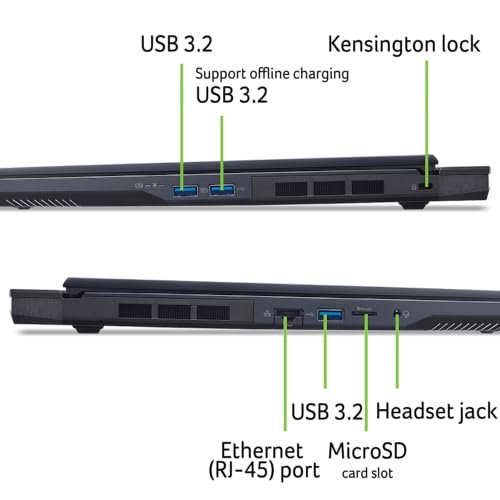
Acer Predator Helios Neo 16
Intel Ultra 9 275HX, RTX 5070 Ti, 16″ WQXGA 240Hz, 16GB, 1TB

Overview
This Acer Predator Helios Neo 16 pairs a strong Intel Ultra 9 275HX with an NVIDIA RTX 5070 Ti. It offers a 16-inch WQXGA 240Hz G-SYNC panel that stays smooth in fast games. I like how quick the 1TB Gen4 SSD boots and loads large files. The laptop is tuned for both play and work.
The Neo 16 also adds Killer Wi-Fi 6E for low lag online. It is a top pick among Best AI Gaming Laptops for players who want speed, crisp visuals, and AI-assist features on a mid-tier price point.
Advantages
- High refresh WQXGA 240Hz for silky gameplay
- Intel Ultra 9 275HX delivers strong CPU cores
- RTX 5070 Ti handles modern games with ease
- 1TB Gen4 SSD boots fast and loads games quickly
- Killer Wi‑Fi 6E reduces multiplayer lag
Limitations
- Only 16GB RAM may limit heavy multitasking
- Battery life is modest under load
- Can run warm during extended sessions
Our Recommendation
I recommend the Acer Predator Helios Neo 16 for gamers who want a fast screen and a solid GPU without paying flagship prices. It fits streamers who use AI overlays and gamers who want sharp 240Hz play. If you want a reliable pick from the Best AI Gaming Laptops group, this balances power and value.
Best Use Cases
| Best for | Why It Works |
|---|---|
| Competitive Gaming | 240Hz panel and RTX GPU for low input lag |
| Streaming | Fast SSD and CPU for quick scene loads |
| Everyday Work | Strong CPU for office apps and browsers |
Acer Nitro V 16S AI
AMD Ryzen 7 260, RTX 5060 572 AI TOPS, 16″ 180Hz, 32GB, 1TB

Overview
The Acer Nitro V 16S AI blends an AMD Ryzen 7 260 CPU with an RTX 5060 that lists 572 AI TOPS. It shines with a 16-inch 180Hz WUXGA panel and roomy 32GB DDR5 memory. I find it smooth for multitaskers and gamers who also run AI tools. The 1TB Gen4 SSD keeps files close and fast.
This Nitro model is a practical member of Best AI Gaming Laptops. It gives strong RAM and AI-assisted GPU power at a lower cost than elite rigs. If you value memory and AI boosts, the V 16S is a smart pick.
Advantages
- 32GB DDR5 for heavy multitasking
- RTX 5060 supports AI features and DLSS
- Large 1TB Gen4 SSD for games and assets
- 180Hz panel balances speed and clarity
- Good price-to-specs for AI-aware users
Limitations
- Ryzen 7 260 is mid-range for CPU-heavy tasks
- Display is WUXGA, not higher resolution
- Battery life varies under AI workload
Our Recommendation
I recommend the Acer Nitro V 16S AI for content creators and gamers who need lots of RAM and AI assist without a huge cost. It ranks well among Best AI Gaming Laptops for memory-heavy workflows and streaming. If you want a stable, fast machine for both play and AI tools, this one is a great value.
Best Use Cases
| Best for | Why It Works |
|---|---|
| Content Creation | 32GB RAM lets you edit and render smoothly |
| Multitasking | Good memory for many browser tabs and apps |
| Casual Competitive Play | 180Hz display keeps games smooth |
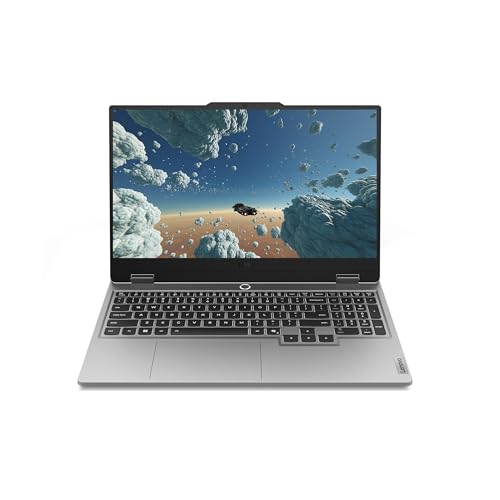
Lenovo Legion LOQ 15.6
Intel i7-13650HX, RTX 5050, 15.6″ 144Hz, 16GB, 1TB, Luna Grey
Overview
The Lenovo Legion LOQ pairs an Intel i7-13650HX with an RTX 5050 and a 15.6-inch 144Hz FHD screen. It is light, yet built to play. I like the balance of CPU power and compact design. The 1TB drive stores games and work files with ease.
This LOQ model is a practical Best AI Gaming Laptops choice for users who want a tidy desktop replacement. It handles streaming, editing, and AI utilities without fuss. If you want a compact yet capable laptop, this is strong on value and control.
Advantages
- Compact 15.6″ form for portability
- i7-13650HX gives solid multi-core speed
- 1TB storage for large libraries
- 144Hz screen good for most competitive titles
- Clean design and build quality
Limitations
- RTX 5050 is entry-level for top AAA settings
- Only 16GB may need future upgrades
- Speakers are average for media work
Our Recommendation
I recommend the Lenovo Legion LOQ 15.6 for gamers who need a portable but powerful machine. It fits students and creators who value compact design and strong CPU power. As part of the Best AI Gaming Laptops list, it offers balanced performance at a modest price.
Best Use Cases
| Best for | Why It Works |
|---|---|
| Students | Portable build for dorms and classes |
| Casual Streamers | Good CPU for encoding and streaming apps |
| Travel Gamers | Light enough to carry and game on the go |
Acer Nitro 16S Copilot+
AMD Ryzen AI 9 365, RTX 5070 Ti, 16″ WQXGA 180Hz, 32GB, 2TB

Overview
The Acer Nitro 16S Copilot+ mixes AMD Ryzen AI 9 365 and an RTX 5070 Ti for strong AI and gaming work. It has 32GB RAM and a 2TB Gen4 SSD for big projects. I find the 16-inch WQXGA 180Hz screen crisp and bright, ideal for high-detail play. This model leans into AI features and fast storage.
As a standout in Best AI Gaming Laptops, it serves creators and gamers who need both space and speed. If you want local AI help, large storage, and a crisp screen, the Copilot+ fits well.
Advantages
- AMD Ryzen AI 9 adds on-device AI power
- RTX 5070 Ti handles modern titles smoothly
- 32GB RAM for heavy workflows
- 2TB Gen4 SSD gives lots of fast storage
- WQXGA 180Hz screen for clear, smooth visuals
Limitations
- Larger storage adds weight
- High specs increase price
- Fans can be audible under load
Our Recommendation
I recommend the Acer Nitro 16S Copilot+ for creators who need local AI acceleration and lots of storage. It ranks high in Best AI Gaming Laptops for its mix of AI CPU, RTX GPU, and roomy SSD. If you want a future-proofed rig for play and content, this is a top pick.
Best Use Cases
| Best for | Why It Works |
|---|---|
| AI Development | On-device AI helps test models and tools fast |
| Large Project Editing | 2TB SSD stores big video and game assets |
| High-Detail Gaming | WQXGA display reveals fine game detail |
MSI Crosshair 18 HX AI
Intel Ultra 9 275HX, RTX 5070 GDDR7, 18″ 2560×1600 240Hz, 32GB

Overview
The MSI Crosshair 18 HX AI offers a large 18-inch 2560×1600 240Hz panel and an Intel Ultra 9 275HX CPU. It packs an RTX 5070 with GDDR7 and 32GB RAM for heavy play and AI work. I like the expansive screen for multi-window tasks and big maps. The Crosshair is built for power-hungry users.
This model ranks among Best AI Gaming Laptops for its big display and raw specs. If you want a desktop-like view with high FPS and AI features, the Crosshair 18 is a strong contender.
Advantages
- Large 18″ display for immersive play
- 240Hz high-resolution panel for very smooth motion
- 32GB RAM supports large projects
- Modern GDDR7 GPU memory for fast frame rates
- Strong Intel Ultra CPU for multi-threaded tasks
Limitations
- Bulkier and heavier than 15″ laptops
- Higher cost for the bigger screen
- Not as battery-friendly on the move
Our Recommendation
I recommend the MSI Crosshair 18 HX AI for gamers who want a near-desktop experience on the go. It stands out in the Best AI Gaming Laptops lineup for its big display and high refresh rate. If you value screen real estate and raw power, this one delivers.
Best Use Cases
| Best for | Why It Works |
|---|---|
| Desktop Replacement | Large 18″ screen gives more workspace |
| Map-heavy Games | Big display makes strategy and MMO play easier |
| Live Production | Screen space helps manage streams and apps |
MSI Stealth 18 HX AI
18″ 4K Mini-LED, Intel Ultra 9-275HX, RTX 5080, 32GB, 2TB SSD

Overview
The MSI Stealth 18 HX AI pairs a 4K Mini-LED display with an Intel Ultra 9-275HX and RTX 5080. It targets creators and pro gamers who want top visuals. I love the mini-LED contrast for HDR work and the vapor chamber cooling that keeps temps steady. The 2TB SSD holds large game and media libraries.
This is a premium choice in Best AI Gaming Laptops. If you want best-in-class display quality and strong RTX power, the Stealth 18 balances beauty and speed for creators who also game.
Advantages
- Stunning 4K Mini‑LED for deep contrast and HDR
- RTX 5080 for top-tier game and AI performance
- Large 2TB SSD for extensive libraries
- Vapor chamber cooling keeps thermals in check
- Wi‑Fi 7 ready for future fast networking
Limitations
- Premium price point
- Heavier than thin ultraportables
- Battery drains faster at 4K and high load
Our Recommendation
I recommend the MSI Stealth 18 HX AI for creative pros and gamers who want the best display and GPU in one machine. It sits at the top of the Best AI Gaming Laptops group for those who need color accuracy and power. If you buy once and want premium, this is worth it.
Best Use Cases
| Best for | Why It Works |
|---|---|
| HDR Editing | Mini-LED display gives accurate color and contrast |
| AAA Gaming | RTX 5080 handles max settings at high res |
| Pro Streaming | High GPU and fast SSD for smooth production |
Acer Predator Helios Neo 16S
16″ 2560×1600 OLED 240Hz, Intel Ultra 9 275HX, RTX 5070 Ti, 32GB

Overview
This Acer Predator Helios Neo 16S upgrades to an OLED 2560×1600 240Hz panel and 32GB RAM. The Intel Ultra 9 275HX and RTX 5070 Ti with DLSS4 aim for high FPS and AI-assisted upscaling. I notice vivid color and ultra-smooth motion on this screen. The 1TB SSD is quick for big games.
As one of the Best AI Gaming Laptops, it blends OLED clarity with AI boost. If you want top visuals and strong multitask memory, the Neo 16S is a great bridge between performance and display quality.
Advantages
- OLED 2560×1600 panel with 240Hz for crisp visuals
- 32GB RAM handles heavy multitasking
- DLSS4 and RTX 5070 Ti boost frame rates
- Strong CPU for streaming and editing
- Good balance of display and GPU power
Limitations
- OLED may show burn-in risk with static UI
- Higher cost due to advanced panel and RAM
- Fans can ramp under sustained loads
Our Recommendation
I recommend the Acer Predator Helios Neo 16S for gamers who want stunning OLED visuals and high refresh rates. It joins the Best AI Gaming Laptops for users who value display clarity and AI frame boosts. If you want a visual edge in games and creative tasks, this laptop is a top option.
Best Use Cases
| Best for | Why It Works |
|---|---|
| Visual Creators | OLED color depth helps photo and video work |
| Competitive Visual Play | 240Hz OLED gives both speed and clarity |
| AI Upscaling | DLSS4 improves frame rates with AI |
Final Verdict
I found each pick brings clear strengths across the Best AI Gaming Laptops field. Some favor display quality, others CPU power or AI acceleration, so you can match needs to budget.
If you want the sharpest visuals pick an OLED or mini‑LED model. If you need raw AI compute and storage choose a 32GB/2TB option. I trust these choices to cover gamers and creators who want AI boosts and solid play.
Frequently Asked Questions
An AI gaming laptop pairs a modern GPU with dedicated AI features or NPUs to accelerate tasks like upscaling, streaming, and creative tools.
Yes. AI tools like DLSS and upscalers raise frame rates and image quality with low overhead on many Best AI Gaming Laptops.
Aim for 16GB as a base, and 32GB if you stream, edit, or run local AI models often.
Yes. Most Best AI Gaming Laptops combine fast CPUs, ample RAM, and large SSDs suited for video editing and rendering.






4 Comments