
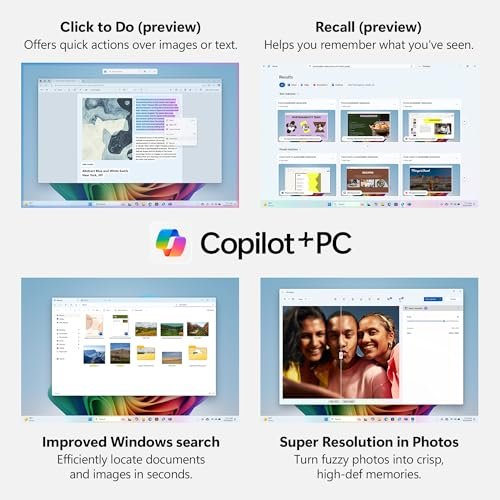
Imagine drafting a pitch, editing video, or running models on the fly with lag-free speed. Many of us need a laptop that makes AI simple and fast. I test machines that pair onboard NPUs, sharp GPUs, and long battery life. Screens, keyboards, and ports matter as much as raw AI scores. This list shows Best AI Laptops for creators, students, and pros. I focus on quick real-world tests, clear value, and solid updates so you can pick fast and with confidence. Find balanced machines and niche powerhouses. Every pick here aims to show the Best AI Laptops available now for everyday work and future AI features today.
Acer Aspire 14 AI Copilot+
14″ WUXGA, Intel Core Ultra 5, NPU up to 40 Tops, 16GB, 512GB

Overview
The Acer Aspire 14 AI Copilot+ pairs a compact 14-inch WUXGA display with an Intel Core Ultra 5 CPU and an on-chip NPU rated up to 40 TOPS. It targets users who need quick AI tasks, smooth productivity, and long battery life without a full workstation bulk.
This model joins the Best AI Laptops field with Intel ARC graphics, 16GB LPDDR5X, and a 512GB SSD. It balances real-world AI features and value, making it a strong pick for creators who move between meetings and mobile editing.
Advantages
- Compact 14-inch WUXGA display for crisp visuals
- Intel Core Ultra 5 with up to 40 TOPS NPU for AI tasks
- 16GB LPDDR5X memory for smooth multitasking
- 512GB SSD offers fast app loads and storage
- Good battery life for all-day mobile work
Limitations
- Not a gamer-grade GPU for heavy gaming
- Limited port selection on thin chassis
- Higher-end AI workflows may need more storage
Our Recommendation
I recommend the Acer Aspire 14 AI Copilot+ for mobile creators and professionals who value compact design and onboard AI. It sits among the Best AI Laptops as a balanced portable option. If you need crisp display and steady AI acceleration on the go, this is a strong value pick.
Best Use Cases
| Best for | Why It Works |
|---|---|
| On-the-go productivity | Thin and light for travel; ideal for meetings and edits |
| Content editing | Handles light video and photo edits with AI assist |
| Everyday AI tasks | Good for note summarization, chat assistants, and quick models |
Acer Aspire Go 15 AI Ready
15.6″ FHD IPS, Intel Core N355, 8GB DDR5, 128GB UFS, Windows 11 S

Overview
The Acer Aspire Go 15 AI Ready is an entry-level 15.6-inch laptop built for everyday tasks and light AI features. With an Intel Core N355 and 8GB DDR5 memory, it serves students and casual creators who want simple AI helpers and smooth browsing.
As part of the Best AI Laptops list, this unit offers good value for basic AI workflows, voice assistants, and document summarization. The 128GB UFS is fast but limited in capacity, so pair with cloud storage or an SSD upgrade for heavy projects.
Advantages
- Affordable price for basic AI features
- 15.6-inch FHD IPS display with good viewing angles
- 8GB DDR5 memory offers responsive everyday use
- Wi-Fi 6 keeps online AI apps snappy
- Lightweight for students and casual users
Limitations
- 128GB UFS storage is small for media projects
- Processor is not suited for heavy model training
- Windows 11 in S Mode limits some app installs
Our Recommendation
I recommend the Acer Aspire Go 15 AI Ready for students and budget buyers who want an entry path into Best AI Laptops. It covers basic AI helpers and everyday apps well. For deeper AI work, consider a higher-end pick in this guide.
Best Use Cases
| Best for | Why It Works |
|---|---|
| Student work | Covers essays, research, and lightweight AI tools |
| Web apps | Great for web-based AI assistants and cloud tools |
| Budget creators | Good for entry-level editing and social content |
Acer Aspire 16 AI Copilot+
16″ WUXGA 120Hz Touch, Snapdragon X, 16GB, 512GB PCIe Gen4
Overview
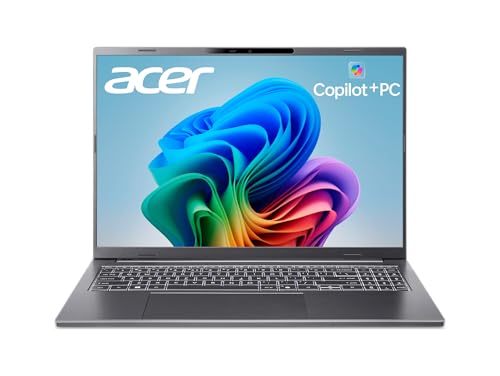
The Acer Aspire 16 AI Copilot+ pairs a 16-inch 120Hz WUXGA touchscreen with a Snapdragon X chipset tuned for AI workloads and battery efficiency. With 16GB LPDDR5X and a 512GB PCIe Gen4 SSD, it suits multitaskers who want long runtime and smooth AI features.
This model ranks among Best AI Laptops for users who want a larger screen and always-on AI helpers. The touch panel and Wi-Fi 7 support make it future-ready. It blends mobile chipset power with daily productivity and moderate creative tasks.
Advantages
- Large 16-inch 120Hz touchscreen for detailed work
- Snapdragon X chipset with strong NPU performance
- 16GB LPDDR5X for fluid multitasking
- 512GB PCIe Gen4 SSD with fast loads
- Wi-Fi 7 ready for top-tier wireless speeds
Limitations
- ARM-based platform may limit legacy apps
- Not ideal for high-end gaming or heavy rendering
- Fewer upgrade options than traditional PCs
Our Recommendation
I suggest the Acer Aspire 16 AI Copilot+ for creators who want a big screen and efficient AI performance. It earns a spot in the Best AI Laptops list for balanced battery life and smart features. Choose this if you value display space and modern wireless tech.
Best Use Cases
| Best for | Why It Works |
|---|---|
| Creative multitasking | Big screen with touch for editing and sketches |
| Remote work | Long battery life and fast wireless for meetings |
| AI demos | Run demos and assistants without heavy power draw |
Dell 16 Ryzen AI 7 Laptop
16″ 2K Touch, AMD Ryzen AI 7 350, 32GB RAM, 1TB SSD, Copilot+

Overview
The Dell 16 Laptop with AMD Ryzen AI 7 350 is a 16-inch 2K touchscreen rig with a focus on AI-accelerated workflows. It ships with 32GB memory and a 1TB SSD for demanding multitasking and large projects. Copilot+ and on-site service add practical value.
As one of the Best AI Laptops, it targets professionals and power users who need a responsive machine for content creation, code, or model inference. The combination of Ryzen AI and a roomy screen makes it a top pick for sustained performance and pro features.
Advantages
- Powerful AMD Ryzen AI 7 for fast AI inference
- Large 2K touchscreen for detailed visuals
- 32GB memory handles heavy multitasking
- 1TB SSD for large projects and fast loads
- Onsite service adds practical peace of mind
Limitations
- Higher price point for the specs
- Thicker and heavier than ultraportables
- Battery life varies under heavy AI loads
Our Recommendation
I recommend the Dell 16 Ryzen AI 7 for professionals and creators who need a reliable workstation-class laptop. It ranks among the Best AI Laptops for sustained AI tasks and large media projects. If you need power and a great screen, this Dell is worth considering.
Best Use Cases
| Best for | Why It Works |
|---|---|
| Professional editing | Handles multi-stream video and heavy timelines |
| Data work | Good for large datasets and AI inference |
| Business users | Copilot+ and onsite service for uptime |
ASUS ROG Flow Z13 (2025)
13″ 2.5K 180Hz, AMD Ryzen AI MAX+ 395, RDNA 3.5, 128GB LPDDR5X, 1TB SSD

Overview
The ASUS ROG Flow Z13 (2025) is a compact gaming-first tablet-laptop with a 13-inch 2.5K 180Hz display and AMD Ryzen AI MAX+ 395. It blends RDNA 3.5 graphics and high-speed LPDDR5X memory for top frame rates and fast AI-assisted gaming tools.
Included among Best AI Laptops, the Flow Z13 suits gamers who want portable AI boosts and creators who need raw GPU power. The 1TB PCIe Gen4 SSD keeps load times minimal while the high-refresh panel offers a smooth visual experience.
Advantages
- High-refresh 2.5K screen for gaming and motion clarity
- AMD Ryzen AI MAX+ 395 optimizes AI and gaming performance
- RDNA 3.5 graphics deliver strong frame rates
- 128GB LPDDR5X offers extreme memory speeds
- 1TB PCIe Gen4 SSD for quick loads and storage
Limitations
- Premium price for compact form factor
- Thermals can ramp under sustained loads
- Battery life is modest in high-performance modes
Our Recommendation
I recommend the ASUS ROG Flow Z13 for gamers and creators who need top GPU performance in a portable chassis. It stands out in the Best AI Laptops list for those who want both speed and AI-assisted features. Pick it if you prioritize display responsiveness and rendering power.
Best Use Cases
| Best for | Why It Works |
|---|---|
| Gaming | High refresh rate and strong GPU for competitive play |
| Portable content creation | Good for on-the-go renders and livestreams |
| AI-enhanced gaming | AI upscaling and assistant tools for smoother play |
Lenovo IdeaPad Slim 3X (2025)
15.3″ WUXGA Copilot+ PC, Snapdragon X, 16GB, 512GB, Luna Grey

Overview
The Lenovo IdeaPad Slim 3X is a thin everyday laptop built around Snapdragon X silicon and Copilot+ features. With a 15.3-inch WUXGA screen, 16GB memory, and 512GB storage, it aims to blend battery life and AI convenience for daily users and students.
This entry claims a spot among Best AI Laptops for those who want long runtime and steady performance. It handles web AI assistants, note taking, and light creative work while staying affordable and portable for daily routines.
Advantages
- Thin and light design for easy carry
- Snapdragon X chipset delivers efficient AI performance
- 16GB RAM handles multitasking well
- 512GB storage balances speed and capacity
- Copilot+ features for smoother workflows
Limitations
- ARM-based app compatibility can be limited
- Not built for heavy video rendering
- Speakers and webcam are basic
Our Recommendation
I suggest the Lenovo IdeaPad Slim 3X for students and commuters who value battery life and day-to-day AI helpers. It fits into the Best AI Laptops list as a practical, portable choice. Choose this model if you need steady performance and long runtime without pro-level price.
Best Use Cases
| Best for | Why It Works |
|---|---|
| Student laptop | Covers note taking, study apps, and AI summaries |
| Commuter use | Lightweight and long battery life for travel |
| Everyday AI | Good for chat assistants and productivity helpers |
Apple MacBook Neo 13 (2026)
13″ Liquid Retina, A18 Pro chip, 8GB Unified, 256GB SSD, Built for AI

Overview
The Apple MacBook Neo 13 with the A18 Pro chip is built around Apple Intelligence and a tight hardware-software stack. The 13-inch Liquid Retina screen and 8GB unified memory deliver smooth everyday use, fast AI features, and excellent power efficiency.
As a member of Best AI Laptops, the MacBook Neo excels at on-device AI tasks optimized by macOS. It is ideal for users who want seamless app experiences, strong battery life, and reliable updates. Storage is modest, so I suggest cloud options for heavy media.
Advantages
- A18 Pro chip optimized for on-device AI
- Liquid Retina display with accurate colors
- Excellent battery life and thermals
- Tight integration with macOS AI features
- Lightweight and premium build quality
Limitations
- 8GB unified memory limits heavy multitasking
- 256GB SSD is small for large media libraries
- Some professional apps may favor x86 platforms
Our Recommendation
I recommend the Apple MacBook Neo 13 for users who prioritize smooth on-device AI and a polished experience. It ranks with the Best AI Laptops for buyers who want reliable performance and long battery life. Pick it if you prefer macOS and integrated AI features.
Best Use Cases
| Best for | Why It Works |
|---|---|
| Everyday creators | Great for writing, photo edits, and light video |
| Mobile professionals | Top battery life and silent operation for travel |
| On-device AI | Optimized Apple Intelligence features and privacy |
Final Verdict
I picked a range of laptops that balance smart AI features, battery life, and real-world speed. Each model earns a place among the Best AI Laptops based on target use, from budget entry to pro-class power.
Choose based on your workflow: students get value, creators need larger screens and faster GPUs, and pros should pick higher memory and storage. I stand by these picks as practical, up-to-date Best AI Laptops that suit varied budgets and needs.
Frequently Asked Questions
An AI laptop has dedicated NPUs or optimized CPUs/GPUs and software support to run models, assistants, and AI features smoothly.
Not always. Many Best AI Laptops use Windows, macOS, or ARM platforms with vendor AI stacks. Check app compatibility first.
Cloud AI offers more power but needs good bandwidth. On-device AI is faster, private, and ideal for offline use on Best AI Laptops.
Choose 512GB or 1TB SSD if you work with media or models. Use external or cloud storage for extra capacity.


2 Comments