
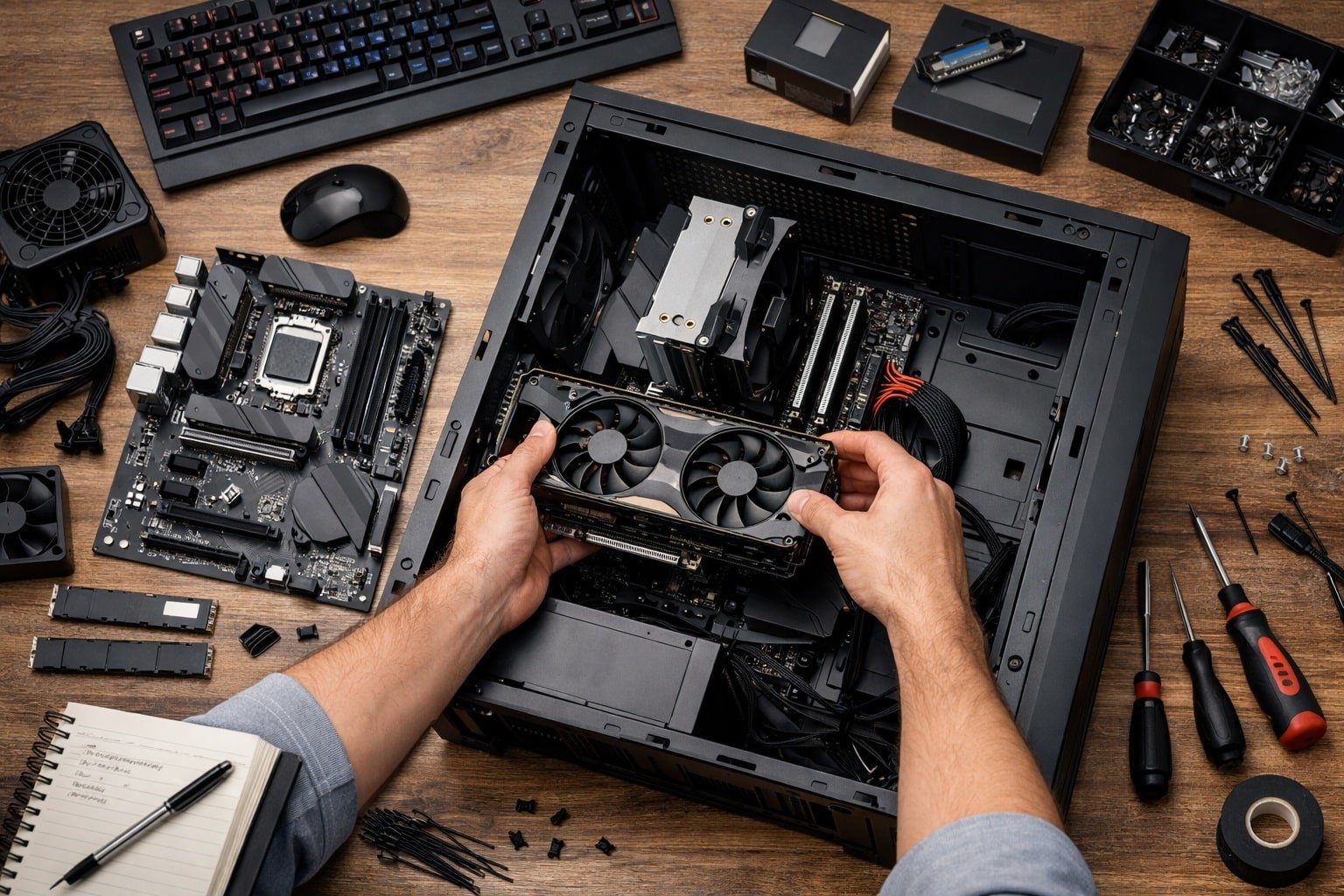
Pick parts that match your games and budget, then assemble with care.
You want to learn how to build gaming pc for beginner. You are in the right place. I build rigs for friends, teens, and first-time builders often. This guide shows how to build gaming pc for beginner step by step. It blends real tips with clear steps. It keeps jargon light. It gives you the why and the how, so you can finish with pride and a stable system.

Source: amazon.com
What You Need To Know Before You Start
You can master how to build gaming pc for beginner with a plan. Set a target, pick parts that fit, and build in calm steps. Think of it like LEGO, but with power cables.
Start with three simple choices:
- Your games and target frame rate Pick your top five titles. List 1080p, 1440p, or 4K, and 60 or 144 fps.
- Your total budget Include Windows, tools, and a monitor if needed.
- Your look and size ATX is easy. Micro ATX saves space. ITX is small but harder.
Key terms in plain words:
- CPU The brain for game logic and tasks.
- GPU The graphics chip that draws frames.
- RAM Short-term memory for fast tasks.
- Storage Where games live. NVMe SSDs are very fast.
- PSU Power box that feeds everything.
- Motherboard The board that links all parts.
- Case The shell with fans and space.
- Cooler Keeps the CPU from getting hot.
Fast answers people ask when they search how to build gaming pc for beginner:
- Do I need a big budget No. A smart 1080p build can be very cheap and smooth.
- Is building hard Not if you go slow and follow steps.
- How long will it take First build can take 2–4 hours. Plan a calm evening.

Source: youtube.com
Pick Your Parts: A Beginner-Friendly Checklist
Focus on balance. Do not overspend on the CPU and starve the GPU. Here is a simple parts map that fits how to build gaming pc for beginner:
CPU
- Great entry picks AMD Ryzen 5 7600. Intel Core i5-14400F. Both are strong for 1080p and 1440p.
- Avoid old low-core chips. They can bottleneck new GPUs.
GPU
- 1080p high settings NVIDIA RTX 4060. AMD Radeon RX 7600 XT.
- 1440p sweet spot NVIDIA RTX 4070 Super. AMD Radeon RX 7800 XT.
- Pick based on your games and upscalers like DLSS or FSR.
Motherboard
- Match the socket to your CPU. AM5 for new Ryzen. LGA1700 for 12th to 14th gen Intel.
- For first builds, get a board with clear labels, Wi‑Fi, and debug LEDs if possible.
RAM
- 16 GB is fine for 1080p. 32 GB is ideal for modern AAA.
- Get two sticks. Enable XMP or EXPO later.
Storage
- 1 TB NVMe SSD for OS and games. Add a SATA SSD if needed.
- PCIe 4.0 NVMe drives give fast load times.
PSU
- Aim for 80 Plus Gold. Get headroom.
- 550–650W for entry GPUs. 750–850W for mid to high GPUs.
- Check the GPU’s recommended wattage.
Case
- Pick one with good airflow. Mesh front is best.
- Ensure GPU length and cooler height fit.
Cooler and fans
- Stock coolers work for non-X chips. Aftermarket towers are quiet and cool.
- Use two or three case fans at least. Two intake, one exhaust.
Peripherals
- A 1080p 144 Hz screen feels very smooth.
- Get a basic mouse and keyboard now. Upgrade later.
Tip from my builds If your budget is tight, shift funds to the GPU first. That aligns with how to build gaming pc for beginner and gives more fps per dollar.

Source: teachkidsengineering.com
Budget Builds By Resolution and Use Case
Use these example paths. Prices shift, so treat as a guide. They reflect how to build gaming pc for beginner with real goals.
1080p esports and popular titles
- CPU Ryzen 5 7600 or i5-13400F
- GPU RTX 4060 or RX 7600 XT
- RAM 16 GB DDR5-6000
- Storage 1 TB NVMe
- PSU 650W Gold
- Case Airflow mesh mid-tower
1440p AAA and creator mix
- CPU Ryzen 7 7700 or i5-13600K
- GPU RTX 4070 Super or RX 7800 XT
- RAM 32 GB DDR5
- Storage 1 TB NVMe + 2 TB SATA SSD
- PSU 750W Gold
- Case Airflow focus with 3–4 fans
Small form factor living room rig
- CPU Ryzen 5 7600
- GPU RTX 4060 Ti short model
- RAM 32 GB low-profile
- SFX 650W PSU
- ITX case with two 120 mm fans

Source: youtube.com
Tools, Safety, and Prep
You do not need a lab. For how to build gaming pc for beginner, keep it simple.
Tools
- Phillips screwdriver with magnetic tip
- Zip ties and a small flush cutter
- Thermal paste if your cooler has none
- A small flashlight
Safety
- Work on a clean table. No carpet if you can.
- Touch the case often to ground yourself.
- Keep drinks away from parts.
Prep steps
- Update your case and motherboard manuals on your phone.
- Make a Windows 11 USB with the Media Creation Tool.
- Back up old files if reusing parts.
Source: youtube.com
Step-by-Step Assembly Guide
Follow this flow. It keeps the hard parts out in the open. This is the best path for how to build gaming pc for beginner.
- Build on the motherboard box
- Place the board on its box. It protects the back.
- Open the CPU socket. Match the triangle. Lower the lever gently.
- Install the CPU cooler backplate if needed
- Check the manual. Some coolers use the stock backplate.
- Dry-fit first so you know the order.
- Add RAM
- Open the two slots furthest from the CPU on most boards.
- Press until the latches click.
- Install the NVMe SSD
- Unscrew the M.2 shield if present.
- Insert at an angle. Press down. Screw in lightly.
- Mount the PSU in the case
- Fan down if there is a bottom vent.
- Route the 24‑pin, EPS 8‑pin, and PCIe GPU cables now.
- Install standoffs and put the board in
- Check that every hole has a standoff.
- Lower the board in at an angle. Screw in with light pressure.
- Front panel and I/O cables
- Plug in front panel pins. Use the manual’s map.
- Connect USB 3, USB‑C, and HD Audio.
- Case fans and airflow
- Front fans pull air in. Top and rear push air out.
- Use PWM headers on the board if you can.
- Install the CPU cooler
- Pea-sized thermal paste if the plate is bare.
- Tighten screws in a cross pattern. Do not over-tighten.
- Install the GPU
- Remove the case slot covers. Seat the card in the top PCIe slot.
- Screw in the bracket. Click in PCIe power.
- Storage and extras
- Add SATA drives if you have them.
- Tidy cables with zip ties.
- Final check
- 24‑pin and 8‑pin CPU power plugged in
- GPU PCIe cable plugged in
- RAM seated and latched
- CPU fan on CPU_FAN header
- Front panel pins correct
This is the path I use in every client build. It cuts errors and stress. It is simple and solid for how to build gaming pc for beginner.
Source: tomsguide.com
First Boot, BIOS, and Windows Setup
First boot
- Plug in the monitor to the GPU. Not the motherboard.
- Power on. If there is no display, hold the power button and recheck cables.
BIOS setup
- Update BIOS if the board has EZ Flash.
- Set XMP or EXPO for your RAM.
- Set the NVMe as the first boot device.
- Enable Resizable BAR if your GPU supports it.
Windows install
- Boot from the USB.
- Delete old partitions on the target drive.
- Let Windows create new ones in GPT mode.
- Skip the product key if you will add it later.

Source: youtube.com
Drivers, Updates, and Benchmarking
Drivers and updates
- Install chipset drivers for your platform.
- Install the GPU driver from the vendor app.
- Run Windows Update until there are no pending patches.
Stress test and verify
- Use a built-in game benchmark you own.
- Watch temps and clocks in a hardware monitor.
- Check that RAM speed matches the XMP or EXPO profile.
What good temps look like
- CPU idle 30–45°C. Gaming 60–85°C.
- GPU gaming 60–85°C. Spikes are normal if brief.
If results seem low
- Re-seat the GPU. Try a different PCIe cable.
- Check the power plan. Set it to Balanced or High Performance.
- Ensure the monitor is set to the right refresh rate.
This step sets trust in your work. It closes the loop on how to build gaming pc for beginner with proof.
Source: co.uk
Cable Management, Airflow, and Temps
Cable tips
- Run thick cables behind the tray.
- Use short runs and tie slack in bundles.
- Keep the GPU area open for air.
Airflow plan
- Two front intake. One rear exhaust is the base.
- Add a top exhaust if your GPU runs warm.
- Aim for slight positive pressure. More intake than exhaust.
Noise control
- Make a gentle fan curve in BIOS.
- Lower idle fan speeds. Keep load speeds safe.
These small moves can drop temps by 5–10°C. They also cut noise a lot.
Common Mistakes and How to Avoid Them
Skip these and your first build will feel pro. These points are core to how to build gaming pc for beginner.
- Wrong parts Check CPU socket and RAM type.
- Weak PSU Buy quality. Leave headroom.
- No standoffs Short risk. Always use them.
- Too much paste A small pea is enough.
- Forcing cables If it will not seat, check the notch.
- Monitor on the wrong port Use the GPU’s port, not the motherboard’s.
My early mistake I once forgot the 8‑pin CPU power. The fans spun. No display. It took 20 minutes to spot. Use the final checklist. It works.
Upgrades and Future-Proofing
Plan for change. That is smart how to build gaming pc for beginner thinking.
- Leave two RAM slots open if you can.
- Get an extra NVMe slot for a second SSD.
- Buy a PSU with extra PCIe cables.
- Pick a case that fits long GPUs and tall coolers.
- Keep drivers and BIOS current for new features.
Good news You can reuse the case, PSU, and SSD for years. Most upgrades are simple drop-ins.
Frequently Asked Questions of how to build gaming pc for beginner
What is the best budget for a first build?
Aim for a range that matches your games. Many start around $700–$1,000 for 1080p and go up from there.
How long does a gaming PC last before upgrades?
Three to five years is common for core parts. A GPU swap after two to three years can refresh a build.
Do I need an anti-static wrist strap?
It helps, but is not required. Touch the case often and avoid carpet to stay grounded.
Should I choose AMD or Intel for a beginner build?
Both are great now. Pick based on price, features you want, and the board you like.
Is water cooling better than air cooling for beginners?
Air cooling is easier and very good today. Use a 120–170 mm tower and you will be fine.
Can I build without a DVD drive?
Yes. Use a USB stick for Windows and drivers. Most cases skip optical bays today.
How do I know if my parts fit my case?
Check GPU length, cooler height, and radiator space in the case specs. Compare to the part specs before you buy.
Will building a PC void my warranties?
No. Parts have their own warranties. Keep boxes and receipts for any claims.
Conclusion
You now know how to plan, pick parts, build, and tune. You also saw common traps and how to dodge them. That is the core of how to build gaming pc for beginner, from start to first game.
Start small and steady. Make a parts list today. Set a budget and goal frame rate. Follow the steps, test well, and enjoy smooth play. Share your build, ask questions, and keep learning. If this helped, subscribe for more guides, or drop a comment with your parts list and goals.




One Comment