
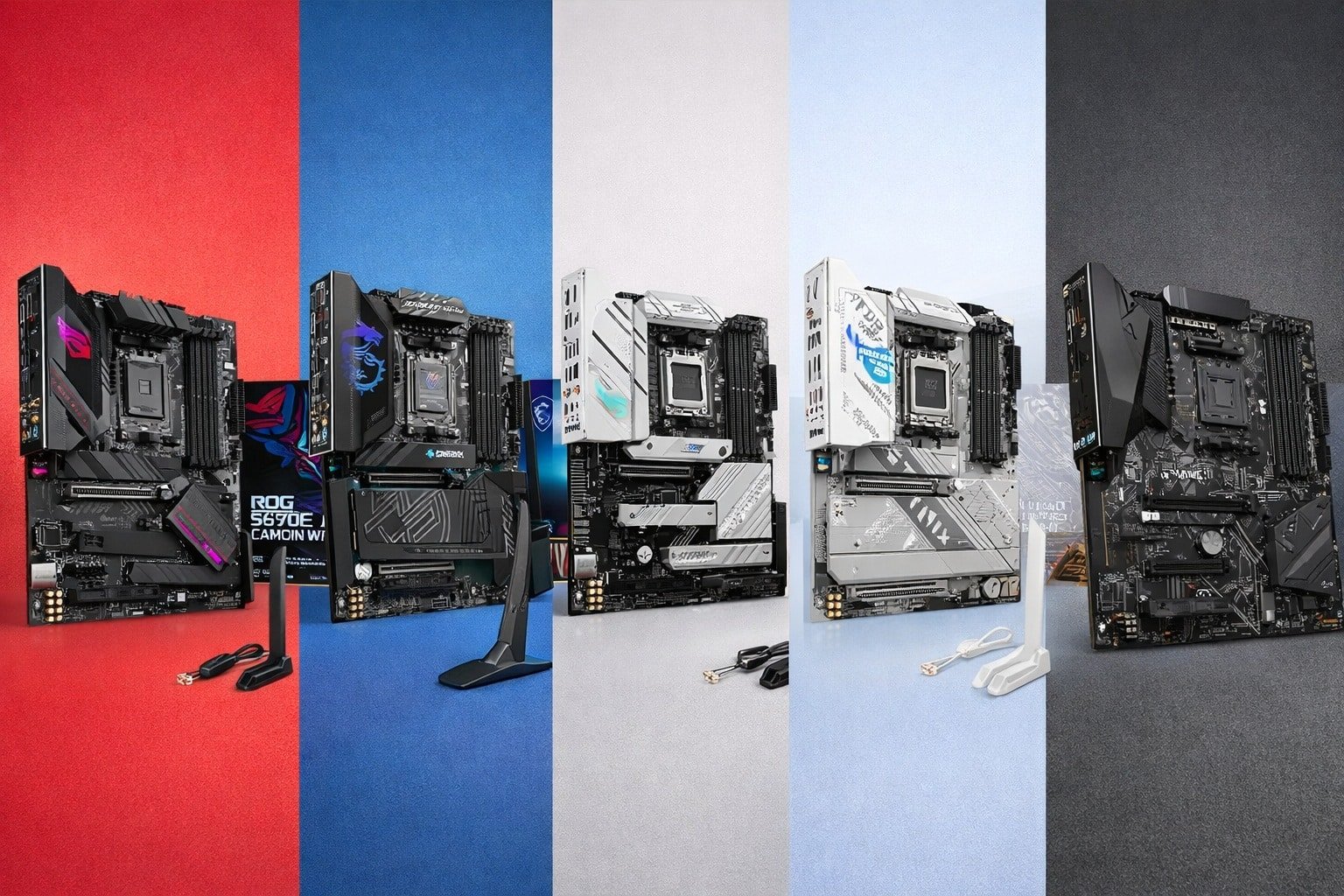
The best motherboard for gaming PC depends on your CPU, budget, and features.
You want a fast, smooth, and stable gaming rig. But the motherboard can feel like a maze of slots, lanes, and buzzwords. I’ve built and tuned many PCs, and I know how one board can make or break a build. The right board handles heat, power, storage, and overclocking with less fuss.
It also fits your case, your wallet, and your upgrade plan. Below, I break down the best motherboard for gaming pc options across AM4 and AM5, so you can pick with confidence and avoid costly mistakes.

Asus ROG Strix B550-F Gaming…
AM4 socket: Ready for AMD Ryzen 3000 and 5000 series, plus 5000 and 4000 G-series desktop processors. Bluetooth v5.2 Best gaming connectivity: PCIe 4.0-ready, dual M.2 slots, USB 3.2 Gen 2…

MSI MPG X870E Carbon WiFi…
Supports AMD Ryzen 9000/8000/7000 Series Desktop Processors Premium Thermal Design: Heavy plated MOSFET heatsink with heat-pipe / high quality 7W/mK MOSFET thermal pads / extra choke thermal pads / onboard…

ASUS ROG Strix B650-A Gaming…
AM5 Socket: Ready for AMD Ryzen Desktop 9000, 8000, and 7000 Series Processors BIOS Update maybe required when used with AMD Ryzen Desktop 9000 and 8000 Series CPU Processors Robust…
ASUS ROG Strix B550-F Gaming WiFi II (AM4)

If you want a proven AM4 base, this ROG Strix is a smart pick. It handles Ryzen 5000 chips with ease. It gives you PCIe 4.0 for your GPU and main NVMe drive. WiFi 6E and 2.5Gb LAN keep online play fast and steady.
The VRM runs cool for long sessions. BIOS FlashBack makes updates safe and easy. HDMI 2.1 is handy for high refresh 4K use. Aura Sync lighting ties the build together with a clean look.
Pros:
- Strong VRM for Ryzen 5000 gaming and light OC
- PCIe 4.0 for GPU and main M.2 NVMe
- WiFi 6E plus 2.5Gb LAN for low-lag play
- BIOS FlashBack helps safe CPU-less updates
- Good audio and clean ROG layout
Cons:
- AM4 platform is near end of life
- No PCIe 5.0 support
- DDR4 only, so no DDR5 speed headroom
My Recommendation
This board fits budget and mid-range gaming towers that use Ryzen 5 5600X or Ryzen 7 5800X3D. If you want to reuse DDR4 RAM and save cash, it shines. It is one of my top AM4 picks for steady frames and easy setup. For users who ask me for the best motherboard for gaming pc on an AM4 budget, I often point here.
| Best for | Why |
|---|---|
| AM4 value builds | Low cost, mature BIOS, stable VRM |
| eSports gaming | Fast network, smooth PCIe 4.0 storage |
| First-time builders | Easy wiring, robust guidance, BIOS FlashBack |
MSI MPG X870E Carbon WiFi (AM5)

The X870E Carbon is a powerhouse for AM5 builds. It supports Ryzen 7000, 8000, and 9000 CPUs. You get PCIe 5.0 for GPUs and M.2 storage. USB-C at 40Gbps, Wi-Fi 7, and 5Gb LAN cover high-speed needs with room to grow.
The board’s VRM is built for high draw and boost bursts. Cooling and shielding on M.2 slots help SSDs run peak. The BIOS is clean and fast to use. If you push high FPS at 1440p or 4K with top GPUs, this board keeps up.
Pros:
- PCIe 5.0 x16 and Gen5 M.2 for next-gen speed
- Wi-Fi 7 and 5Gb LAN for top-tier network
- 40Gbps USB-C for fast docks and drives
- Robust VRM for high-end Ryzen chips
- Great build quality and thermal design
Cons:
- Premium price
- Advanced features may be overkill for entry builds
- Needs good case airflow for best results
My Recommendation
If you want the best motherboard for gaming pc on AM5 with few limits, start here. It is ideal for RTX 4080/4090 class GPUs and fast DDR5 kits. It fits power users, creators, and gamers who want a long upgrade path. The X870E Carbon is a board you can keep across CPU generations with ease.
| Best for | Why |
|---|---|
| Flagship gaming rigs | PCIe 5.0, strong VRM, high I/O headroom |
| Hybrid creator use | 40Gbps USB-C, fast NVMe, stable power |
| Wi-Fi-first homes | Wi-Fi 7 for low-latency gaming |
ASUS ROG Strix B650-A Gaming WiFi (AM5)

This B650-A is a clean, white-accent ROG board for AM5. It supports Ryzen 7000 through 9000. It uses DDR5 memory and offers three M.2 slots. It sticks with PCIe 4.0, which is still fast for most GPUs and SSDs in real-world play.
The 12+2 power design is tuned for smooth boosts. WiFi 6E and 2.5G LAN keep queues fast and stable. The UEFI is simple to tune and has good memory profiles. For a mid-tier AM5 build, it nails the basics and then some.
Pros:
- Great AM5 entry with DDR5 support
- WiFi 6E and 2.5G LAN for steady online play
- Three M.2 slots for roomy game storage
- Solid VRM for mid- to high-end CPUs
- Clean white style that matches themed builds
Cons:
- No PCIe 5.0 lanes
- Fewer high-speed USB ports than flagship boards
- White accents can clash in dark builds
My Recommendation
If you want the best motherboard for gaming pc without overspending, this is a sweet spot pick. It is perfect for Ryzen 7 7700X or 7800X3D with a mid-high GPU. It offers fast DDR5 and painless setup. For most gamers, PCIe 4.0 is plenty, and this saves real money.
| Best for | Why |
|---|---|
| Mid-range AM5 builds | Balanced features, sane price |
| 1440p gaming | Strong CPU support and fast DDR5 |
| White theme PCs | Stylish ROG design that pops |
ASUS ROG Strix X870-A Gaming WiFi (AM5)

The X870-A is a feature-rich AM5 board for power users. You get PCIe 5.0, four M.2 slots, and USB4. WiFi 7 and AI networking help cut lag and shape traffic. ASUS adds Dynamic OC Switcher and Core Flex to fine-tune boosts.
The 16+2+2 power stages handle high draw chips with headroom. DDR5 AEMP profiles make memory setup quick. The Q-Release Slim eases GPU swaps in tight cases. It is a clean blend of speed and ease for advanced gamers.
Pros:
- PCIe 5.0 and USB4 for top-tier bandwidth
- WiFi 7 with smart antenna design
- Four M.2 slots for ample NVMe storage
- AI OC tools and dynamic power tuning
- Great quality with user-friendly touches
Cons:
- Priced above most B-series boards
- Advanced tuning can confuse new builders
- Needs a good case for airflow
My Recommendation
Choose this if you want the best motherboard for gaming pc with smart tuning and a long runway. It suits high-refresh 1440p and 4K rigs that want cutting-edge I/O and stable OC tools. If you swap GPUs often or test builds, Q-Release is a time saver. This board feels like it was built for people who love to tweak.
| Best for | Why |
|---|---|
| Advanced tuners | Dynamic OC, Core Flex, AI tools |
| Storage-heavy gamers | Four M.2 slots for big libraries |
| Next-gen networks | WiFi 7 and USB4 bandwidth |
ASUS ROG Strix B850-A Gaming WiFi (AM5)

The B850-A sits in the sweet spot of the AM5 stack. It has 14+2+2 power stages for smooth boosts. You get four M.2 slots, PCIe 5.0 support, and clean DDR5 tuning. WiFi 7 with Q-Antenna helps keep latency low.
It offers 20Gbps USB-C for fast transfers. AI Networking II can help shape traffic for games. The design is neat and modern with subtle accents. This is an easy board to live with for many years.
Pros:
- Solid VRM for long gaming sessions
- Four M.2 slots for roomy game installs
- WiFi 7 and 2.5G LAN options
- PCIe 5.0 for GPU or M.2 as supported
- Helpful software and tuning tools
Cons:
- Not as many 40Gbps USB ports as X870-class
- Price may still be high for budget users
- White styling may not match some builds
My Recommendation
This is one of my top picks for the best motherboard for gaming pc when you want balance. It fits Ryzen 7 7800X3D up to Ryzen 9 with comfort. It has storage, speed, and simple setup. If you want AM5 future-proofing without X870 prices, go with the B850-A.
| Best for | Why |
|---|---|
| Balanced AM5 rigs | Strong power, smart features, fair price |
| Game libraries | Four NVMe slots for fast loads |
| Online shooters | WiFi 7 with low-lag focus |
GIGABYTE B550 Gaming X V2 (AM4)

This B550 Gaming X V2 is a value AM4 option that still packs speed. It supports Ryzen 3000 to 5000 CPUs. You get PCIe 4.0 from the CPU slot and a Gen4 M.2 for your main SSD. It uses DDR4 to cut total build cost.
The 10+3 power design is fine for mid-range chips. Two M.2 slots give space for more games. Front USB-C is handy for modern cases. Q-Flash Plus helps BIOS updates without a CPU.
Pros:
- Great value for AM4 builders
- PCIe 4.0 where it counts
- Q-Flash Plus for easy BIOS updates
- Front-panel USB-C support
- Clean layout and solid build
Cons:
- No WiFi on board
- Only 1Gb LAN
- Fewer high-end USB ports
My Recommendation
If you want the best motherboard for gaming pc on a tight AM4 budget, start with this GIGABYTE. It is ideal for a Ryzen 5 5600 build with a fast PCIe 4.0 SSD. Add a cheap WiFi card if needed. It is simple, tough, and fast where it counts.
| Best for | Why |
|---|---|
| Budget AM4 rigs | Low cost with PCIe 4.0 support |
| Starter gaming PCs | Easy to learn and build on |
| LAN setups | Wired-first designs work well here |
GIGABYTE B850 AORUS Elite WiFi 7 (AM5)

The B850 AORUS Elite is a strong AM5 board with a long warranty. It supports Ryzen 7000 to 9000 series. You get PCIe 5.0, three M.2 slots, and WiFi 7. 2.5GbE LAN covers wired play with low ping.
The 14+2+2 power stages handle long, heavy loads. EZ-Latch helps with quick M.2 and GPU swaps. The design is clean, with good heatsinks on SSD slots. It is a solid mid-high board that ages well.
Pros:
- PCIe 5.0 for GPU or storage as board supports
- WiFi 7 and 2.5GbE for fast networking
- EZ-Latch for tool-less part swaps
- Strong VRM for Ryzen 9 class chips
- 5-year warranty offers peace of mind
Cons:
- Only three M.2 slots
- Fewer 40Gbps ports than some X870 boards
- RGB is modest if you want flash
My Recommendation
If you want a sturdy pick for the best motherboard for gaming pc with a strong warranty, this AORUS is a winner. It fits high FPS builds with a future path to faster drives. It shines in long gaming sessions and daily use. I like it for gamers who want a “set and forget” AM5 build.
| Best for | Why |
|---|---|
| Warranty-focused buyers | 5-year coverage adds trust |
| High-load rigs | Robust VRM and cooling |
| Tool-less builds | EZ-Latch speeds upgrades |
FAQs Of best motherboard for gaming pc
What size motherboard should I buy for gaming?
ATX fits most builds and has more slots. Micro-ATX is cheaper and compact. Mini-ITX is tiny but needs careful part picks.
Do I need PCIe 5.0 for the best motherboard for gaming pc?
Not always. Most GPUs run fine on PCIe 4.0 today. PCIe 5.0 is great for next-gen SSDs and future GPUs.
Is Wi-Fi 7 worth it right now?
If you game on Wi-Fi, yes. It cuts latency and boosts speed. If you use Ethernet, it is a nice-to-have.
How many M.2 slots do I need?
Two is fine for many gamers. Three or four helps if you keep a huge game library. Fast NVMe drives load maps quicker.
Should I upgrade from AM4 to AM5?
If you want DDR5, longer support, and new features, yes. AM4 is still fine for budget builds. AM5 is the better long-term bet.
Final Verdict: Which Should You Buy?
On AM5, the MSI MPG X870E Carbon and ASUS ROG Strix X870-A are my top picks when you want headroom. For a balanced budget, the ASUS ROG Strix B650-A or B850-A hits the sweet spot.
On AM4, the ASUS ROG Strix B550-F WiFi II is the safe choice, while GIGABYTE B550 Gaming X V2 nails value. The best motherboard for gaming pc is the one that fits your CPU, budget, and upgrade plan today.



One Comment