Best Gaming Mouse for Every Game Lover: Top Picks in 2026
Finding the best gaming mouse for every game lover isn’t just about picking the flashiest model. It’s about comfort, precision, and how it feels during long sessions. Whether you’re into fast-paced shooters or strategy games, the right mouse can make a real difference.
It’s not just about DPI or extra buttons; it’s about what fits your style and hand perfectly. A good gaming mouse should blend smoothly with your gameplay, giving you control without any hassle. Let’s look at options that balance performance and comfort for any kind of gamer.
Redragon Ergonomic Rgb Gaming Mouse
The Best Gaming Mouse for Every Game Lovers who want a reliable, comfortable mouse with customizable features for gaming and work.

Day-to-Day Use Highlights
- The adjustable 7200 DPI sensor adapts easily to different gaming styles and work tasks.
- Ergonomic shape fits most hand sizes comfortably, reducing fatigue during long sessions.
- Customizable RGB lighting and programmable buttons allow personal setup without hassle.
- Wired connection ensures stable and consistent tracking for precise movements.
- Compact size and moderate weight make it easy to control without strain.
Considerations Before Choosing
- Wired design means less portability compared to wireless options.
- Software needed for button programming requires downloading from Redragon’s site.
- No advanced sensor features like lift-off distance adjustment found in high-end mice.
How to Decide If This Mouse Works for You
This mouse suits gamers and office users who want solid performance with ergonomic comfort and customizable features, all at a reasonable price. Its simplicity and durability are good for those who prefer a wired connection without extra complexity.
If you need wireless freedom or cutting-edge sensor tech, this might not meet those specific needs. Also, users who dislike installing extra software might find the programming aspect less convenient.
Thoughts on Practical Use and Setup
The Redragon M602 feels dependable in daily gaming or office use. The ergonomic design supports different grip styles well, and the DPI adjustment lets you switch sensitivity quickly, which is handy across various game genres. The lighting adds a subtle personal touch without being overwhelming.
Programming buttons can take a bit of time initially, but once set up, it streamlines actions and macros effectively. The wired connection eliminates lag concerns, giving confidence during fast-paced gameplay.
Choosing This Mouse for Your Setup
If you are looking for a straightforward, ergonomic gaming mouse with decent customization and no frills, this one fits well. It works best for those who prioritize comfort and reliability over flashy extras or wireless convenience.
Those who want ultra-lightweight or ultra-high-end gaming features may want to explore other options. However, if you want a practical, well-built mouse that handles gaming and office tasks smoothly, this is a balanced choice.
One tip: take some time to explore the software for button programming to get the most out of the mouse. This will enhance your experience and save time in the long run.
Overall, it’s a solid, no-nonsense mouse that meets the needs of many gamers and everyday users without fuss.
Utechsmart Venus Mmo Gaming Mouse
For those seeking the Best Gaming Mouse for Every Game Lovers, the UtechSmart Venus MMO mouse offers a tailored experience especially for MMO players.

The UtechSmart Venus MMO Gaming Mouse is designed to meet the needs of MMO gamers by combining high precision with customizable control. Its standout feature is the adjustable DPI, reaching up to 16400, which allows for precise cursor movement tailored to different gaming scenarios. This mouse helps reduce the frustration of imprecise tracking and delays during intense gameplay.
In daily use, the mouse feels solid and responsive, with well-placed buttons that are easy to reach without looking. The ergonomic design with textured grip keeps the hand comfortable for long sessions. Customizable weights add balance that suits personal preferences, making it easier to maintain accuracy and speed during play.
Everyday Gaming Experience
- High DPI adjustment for fine-tuned sensitivity.
- Multiple programmable side buttons for quick access to commands.
- Ergonomic shape reduces hand fatigue during long sessions.
- RGB lighting customizable for profile identification and mood.
- Durable braided cable and smooth TEFLON feet for consistent tracking.
- Adjustable weights allow personalized feel and control.
Considerations Before Buying
- Designed mainly for right-handed users; left-handed gamers may find it uncomfortable.
- Some may find 12 side buttons overwhelming if not used to many macros.
- Wired connection may limit mobility compared to wireless options.
Thoughtful Gaming Choice
This mouse fits best for MMO and RPG players who appreciate extensive button customization and high DPI precision. It’s a solid pick for those who want a reliable wired mouse with a comfortable grip and lighting options. However, if you prefer wireless freedom or simpler designs, this might feel too complex.
A practical tip is to spend some time programming the side buttons before diving into gaming, to make the most of the mouse’s capabilities. Overall, it offers a dependable experience without flashy gimmicks, giving you control where it counts.
Logitech G502 Hero Wired Gaming Mouse
The Best Gaming Mouse for Every Game Lovers looking for precise control and customization in a wired mouse.

Performance and Features at a Glance
| Sensor | Hero 25K with zero smoothing and acceleration |
| Buttons | 11 customizable with onboard memory |
| Weight | Adjustable with up to five removable weights |
| DPI Range | 100 to 25,600 DPI |
This is a wired gaming mouse designed to offer precise tracking and customization. It solves the problem of inconsistent cursor movement by using the Hero 25K sensor, which delivers 1:1 tracking with no smoothing or acceleration. The adjustable weight system lets users tune the mouse balance to fit their preferences.
In everyday use, the mouse feels solid and responsive. The mechanical switch tensioning provides crisp clicks that improve confidence in fast-paced gaming. I found the programmable buttons helpful for saving commands, making gameplay smoother and more efficient.
Finding Your Ideal Gaming Companion
This mouse suits gamers who want detailed control and customization without wireless interference. Its weight adjustment and high DPI range make it adaptable for various game types and personal styles. It’s especially good for those who prefer a wired connection for reliability.
However, users who dislike wired peripherals or need a lighter mouse might find it less ideal. The size and weight could feel bulky to some. Also, those who do not use advanced customization may not benefit fully from its features.
Thoughtful Choice for Focused Players
If you are looking for a wired gaming mouse that balances performance with customization, this model is worth considering. It works well for games that demand precision and quick reactions. On the other hand, if you prioritize portability or prefer wireless, this may not be the best fit.
One tip is to spend some time adjusting the weights and buttons to match your play style. This can enhance comfort and control over longer sessions. Rest assured, the build quality and sensor accuracy support steady performance without surprises.
Redragon Predator Rgb Gaming Mouse
The Best Gaming Mouse for Every Game Lovers who want customizable precision and comfort for long gaming sessions.

This wired optical mouse is designed to meet the needs of gamers looking for accuracy and customization. It offers up to 8000 DPI with 5 adjustable levels, so you can easily switch sensitivity to match your play style or game type. The 11 programmable buttons allow you to tailor controls for any game or task, enhancing your efficiency and gameplay.
The mouse feels comfortable thanks to its ergonomic claw-grip shape and skin-friendly frosted coating. Its rubber side grip adds control without slipping, even during intense sessions. I found the rapid fire and macro buttons particularly useful for quick actions, saving time and improving precision.
Real-World Experience Highlights
- Easy DPI switching fits different game types and speeds.
- Programmable buttons let you customize commands freely.
- Comfortable grip reduces hand fatigue over hours.
- RGB backlight adds a subtle gaming atmosphere.
- Rubber side texture improves handling and control.
- Wired connection ensures stable responsiveness.
- Software support for DIY keybinds enhances flexibility.
Choosing This Mouse: Considerations
This mouse suits gamers who prefer a wired connection and want full control over button functions. Its ergonomic design helps during long use without discomfort. However, if you prefer wireless or ultra-light mice, this might feel a bit heavier or limiting.
The RGB lighting is modest but not customizable beyond preset modes, which may not satisfy those seeking full lighting control. Also, the size fits claw-grip users best, so palm grip players might find it less comfortable.
Thoughtful Use Advice
If you want a reliable, customizable mouse that supports multiple gaming styles, this model is worth considering. It works well for everyday gaming and productivity with its programmable buttons. For users who need wireless freedom or ultra-lightweight design, exploring other options may be better.
Remember to utilize the software to customize DPI and button assignments fully. This will unlock the mouse’s full potential and adapt it to your gaming preferences without overwhelming complexity.
The solid build and ergonomic shape offer a reassuring experience for long sessions, making it a practical choice for game lovers seeking a balanced, functional mouse.
Logitech G305 Wireless Gaming Mouse
For those seeking the Best Gaming Mouse for Every Game Lovers, this Logitech G305 offers a lightweight, wireless option ideal for competitive and casual gamers alike.

Everyday Gaming Essentials
- Lightweight design (99 grams) ensures easy maneuverability during long sessions.
- Wireless with 1ms report rate reduces lag for precise gameplay.
- HERO sensor delivers up to 12,000 DPI sensitivity for accurate tracking.
- Compact size with built-in USB receiver storage aids portability.
- Long battery life (250 hours on one AA battery) minimizes interruptions.
Points to Consider
- Limited to six programmable buttons, which might not suit users needing more customization.
- Lacks RGB lighting, which some gamers might expect for aesthetics.
- Only available in black color, limiting personalization.
Choosing This Mouse
This mouse suits gamers who want a no-frills, reliable wireless option with solid performance and long battery life. Its lightweight build makes it comfortable to use for hours, and the HERO sensor adds precision without draining power.
However, if you prefer a mouse with more buttons or flashy lighting effects, this might feel a bit basic. Also, those who want a variety of color options might want to look elsewhere.
- Good for competitive and casual gamers prioritizing responsiveness.
- Ideal for users who value portability and simplicity.
- Not the best fit for those needing extensive button customization.
Thoughtful Pick for Focused Players
If you need a wireless mouse that performs well across genres and lasts long without charging fuss, the Logitech G305 is worth considering. It’s straightforward, light, and precise, which helps maintain focus during gaming.
On the flip side, it doesn’t cater to gamers seeking extensive features like RGB lighting or extra buttons. For those who prefer minimal distractions and reliable hardware, this mouse fits nicely.
Before buying, consider if the button count and design meet your gaming style. If they do, you can expect a dependable mouse that doesn’t complicate your setup but supports your gameplay smoothly.
Ffj Master01 Wireless Gaming Mouse
If you are searching for the Best Gaming Mouse for Every Game Lovers, the FFJ Master01 fits well for gamers who want versatility and precision in one device.

Daily Performance and Features
- Tri-mode connectivity (2.4G, USB-C, Bluetooth 5.3) offers flexible device pairing.
- Adjustable DPI up to 24000 for precise control tailored to your game style.
- Long battery life that lasts up to 75 hours without RGB lighting.
- Six programmable buttons allow customization for macros and shortcuts.
- RGB lighting with multiple modes helps set your preferred gaming atmosphere.
Considerations Before Buying
- May require driver installation for full button programming and DPI customization.
- Weight of 0.17 pounds might feel slightly heavy for gamers preferring ultra-light mice.
- RGB lighting consumes more battery, reducing usage time between charges.
Practical Insights for Gamers
The FFJ Master01 is well-suited for gamers who enjoy switching between devices or platforms due to its tri-mode connection options. Its high DPI range and programmable buttons give you control and customization that enhance gameplay across genres.
On the downside, if you prefer a plug-and-play device without extra setup, the need to install software for full functionality might be a hurdle. Still, the mouse feels solid and reliable during extended gaming sessions.
Thoughtful Choice for Multi-Device Users
This mouse is ideal if you play on different systems or want a customizable device that adapts to your needs. However, if you want a very lightweight mouse or dislike managing software, you might find alternatives more suitable.
Try setting up your key macros and DPI settings in advance to save time during games. Overall, it’s a steady, dependable option that balances features and comfort without overwhelming complexity.
Acer Wired Rgb Gaming Mouse
For gamers seeking the Best Gaming Mouse for Every Game Lovers, this Acer mouse suits those who want customizable precision and comfort.

Everyday Gaming and Customization Highlights
- Adjust DPI settings quickly for sniper precision or fast-paced action.
- Programmable buttons offer flexibility for gaming and productivity.
- RGB lighting with 12 modes adds a personalized touch to your setup.
- Comfortable grip and smooth gliding on various surfaces.
- Compatible with multiple operating systems via USB-A connection.
Minor Considerations
- Requires driver download to unlock full DPI range and button customization.
- Wired design limits mobility compared to wireless alternatives.
- Compact size may not suit very large-handed users.
Thoughts on the Acer Wired RGB Mouse
This gaming mouse offers practical features that cater well to casual and serious gamers alike. Its adjustable DPI switching stands out, allowing you to fine-tune sensitivity for different games or tasks. I found the programmable buttons useful for both gameplay and productivity shortcuts, making it versatile beyond just gaming.
On the downside, the need to install software to access all settings could be a minor hassle for those wanting plug-and-play simplicity. The wired design also means you’ll have to manage cable placement, but it does ensure a steady connection without input lag. Overall, the mouse feels solid and comfortable during longer sessions.
Who May Appreciate This Mouse Most
This mouse fits gamers who value customizable precision and want a reliable wired option with added lighting effects. It’s well-suited for those who like tweaking DPI and macros to their preferences. On the other hand, users who prefer a wireless setup or need a larger mouse might want to look elsewhere.
If you decide to get it, take some time to download the driver and save your custom settings carefully to make the most of its features. This mouse offers a good balance of performance and comfort without unnecessary complexity.
Logitech G305 Wireless Gaming Mouse
For gamers seeking the Best Gaming Mouse for Every Game Lovers, this Logitech G305 model offers a balance of performance and comfort.

Everyday Gaming Experience at a Glance
- Wireless freedom with a fast 1 ms response for smooth gameplay.
- Long-lasting battery supports extended gaming sessions without interruption.
- Lightweight design helps reduce hand fatigue during long use.
- Compact size makes it easy to carry and store with built-in USB receiver slot.
- Accurate HERO sensor ensures precise cursor control across game genres.
Considerations for Use
- Requires a single AA battery, which might need replacement over time.
- White color may show dirt or wear more easily compared to darker mice.
- Limited extra buttons; may not suit gamers needing extensive macro controls.
Thoughts on the Logitech G305 Wireless
This mouse is a solid choice for gamers who value precision and wireless convenience without extra bulk. The HERO sensor delivers consistent accuracy that can satisfy most game types, from shooters to strategy. The ultra-long battery life adds confidence for marathon sessions.
That said, it’s a straightforward device without many bells and whistles. If you rely on multiple programmable buttons or prefer a heavier mouse, this might feel a bit basic. But for those wanting a reliable, fuss-free tool, it fits well.
Who Could Benefit Most
The Logitech G305 suits players who want dependable wireless performance in a simple, lightweight form. It works well for casual to serious gamers who don’t need extensive customization but want solid tracking and low latency.
On the other hand, competitive gamers who prefer ultra-customizable setups or heavier mice might want to look elsewhere. Also, if you dislike changing batteries, this mouse’s single AA power source may not be ideal.
- Good for gamers valuing portability and battery life.
- Ideal for users who want fast, precise tracking without extra buttons.
- Less suited for those needing heavy customization or wired-only setups.
A Practical Choice for Wireless Gaming
If you’re looking for a wireless mouse that performs well across game types without complicated features, the Logitech G305 is worth considering. It keeps things simple but effective, especially if you want to avoid cable clutter.
However, if you require extra programmable controls or a heavier feel, this might not be the best fit. My tip: keep a spare AA battery handy to avoid downtime.
Overall, it offers dependable wireless precision with a clean design, making it a steady companion for many gaming setups.
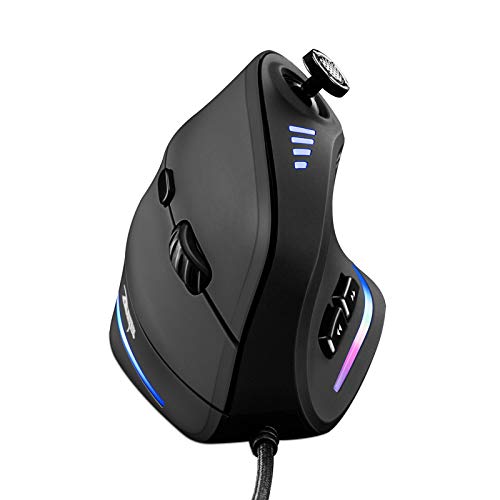
Ergonomic Trelc Vertical Gaming Mouse
This is a solid choice for Best Gaming Mouse for Every Game Lovers seeking comfort and control during long PC gaming sessions.
Daily Use Highlights and Considerations
- Ergonomic vertical design reduces wrist strain and supports a natural handshake grip.
- 5-direction rocker provides precise thumb control for varied gaming styles.
- 11 programmable buttons allow customization tailored to different games.
- Adjustable DPI up to 10,000 ensures sensitivity matches your gameplay needs.
- RGB lighting adds subtle ambiance without being distracting.
- Vertical shape may require an adjustment period if you’re used to traditional mice.
- Wired connection limits mobility compared to wireless options.
- Software setup is necessary for full button customization, which might be a minor hassle.
Thoughtful Choice for Comfort-Focused Gamers
This mouse fits best for gamers who experience wrist fatigue or discomfort and want an ergonomic design that eases strain over long sessions. Its vertical grip and rocker button system support complex inputs in FPS, MOBA, and MMO games without awkward hand positions. However, if you prefer a compact or wireless mouse, this wired vertical model may feel bulky or restrictive. Also, those who dislike configuring software might find the customization setup less straightforward. Keep in mind that adapting to the vertical form takes some time, but once accustomed, it can improve comfort and control. Overall, it’s a practical option for players looking to reduce wrist pain without sacrificing functionality.Practical Insight for Game Lovers
If you frequently game for hours and struggle with wrist or shoulder discomfort, this mouse offers a measured solution through its ergonomic design and precise control features. On the other hand, if portability or wireless freedom is your priority, this may not be the best fit. Before purchasing, consider trying the vertical grip style to see if it suits your hand. For those willing to invest a short adjustment period, this mouse can enhance comfort and gameplay accuracy steadily over time. There’s no rush—comfort improvements often emerge gradually, not instantly.How To Quickly Narrow Down The Best Gaming Mouse For Every Game Lovers
Choosing a gaming mouse can feel overwhelming with so many options available. Start by thinking about your grip style and hand size, as comfort is key for long gaming sessions. Next, consider whether you prefer wired or wireless; each has its advantages. Look at the number of programmable buttons if you play games requiring complex commands. DPI range is important, but many people miss how software customization can enhance performance beyond raw specs. Also, check compatibility with your system to avoid surprises. Finally, think about the mouse’s weight and shape for your preferred games.
The 30-second Checklist For Gaming Mouse Fit
- Does the mouse feel comfortable in your hand during typical gaming grips?
- Is the button layout easy to reach without straining your fingers?
- Can you use the mouse smoothly on your gaming surface?
- Is the cable length or wireless range sufficient for your setup?
- Does the mouse software allow easy customization of DPI and buttons?
- Is the mouse compatible with your operating system and devices?
Common Buyer Regrets And How To Avoid Them
Regret #1: Buying a mouse that feels uncomfortable after extended use. Fix this by testing grip and size before committing, or choosing models known for ergonomic design like the Redragon M602.
Regret #2: Overlooking button programmability for your game type. Many gamers regret missing out on assigning macros. Pick a mouse with software support and enough buttons, such as the UtechSmart Venus.
Regret #3: Ignoring compatibility issues with your system or preferences. Some wireless mice may not work well on all devices. Verify compatibility details and user reviews to ensure smooth use.
Best Gaming Mouse For Every Game Lovers: Decision Table
| If you want… | Look for this | Avoid this |
|---|---|---|
| A comfortable ergonomic shape | Models with proven ergonomic designs and good grip support | Cheap generic shapes without user feedback on comfort |
| Lots of programmable buttons for MMO or MOBA games | Mice with 9+ customizable buttons and strong software | Mice with minimal buttons or no macro support |
| Wireless convenience with solid battery life | Wireless mice offering 40+ hours per charge and multiple connectivity options | Models with short battery life or limited wireless modes |
| Adjustable DPI for different game genres | Mice with easy DPI switching and wide DPI range | Fixed DPI mice or complicated adjustment methods |
| RGB lighting to match your gaming setup | Customizable RGB lighting with software control | Static or no lighting options if you want dynamic effects |
Practical Tips For Using Your Gaming Mouse
- Adjust DPI settings to suit the game type—lower for precision, higher for fast movement.
- Use the mouse software to customize button functions for your favorite games.
- Clean the mouse sensor and feet regularly for smooth tracking and glide.
- If wireless, charge the mouse fully before use and keep the receiver close for best signal.
- Test different grip styles to find what feels most natural and reduces fatigue.
Faqs About The Best Gaming Mouse For Every Game Lovers
Will these gaming mice work with both Windows and Mac?
Most gaming mice support Windows and Mac OS, but it’s best to check the specific product details. Some advanced software features may be limited on Mac.
How do I know if a mouse will fit my hand size?
Look for size specifications and ergonomic design descriptions. If possible, try holding similar models to find a comfortable fit.
Are wireless gaming mice laggy compared to wired ones?
Modern wireless mice often have very low latency comparable to wired. Check for models with high polling rates and good reviews on responsiveness.
Can I reprogram buttons easily on these mice?
Yes, most gaming mice come with software that allows button remapping and macro assignments. The ease of use varies by brand.
How do I maintain my gaming mouse for durability?
Keep it clean, avoid spills, and store it properly. Regularly check for firmware updates and replace worn mouse feet if needed.
Do gaming mice produce a lot of noise?
Button noise varies by model. Mechanical switches tend to be louder, while some mice use quieter switches designed for office or stealth use.
Is RGB lighting distracting during gameplay?
RGB lighting is often customizable or can be turned off. Choose a mouse that lets you control the lighting to suit your preference.
Final Thoughts On The Best Gaming Mouse For Every Game Lovers
Finding the right gaming mouse is about balancing comfort, features, and compatibility with your gaming style. The variety of options means there’s a suitable mouse for nearly every preference and budget.
If you’re unsure, a good tie-break rule is to prioritize comfort and button layout first, then look at DPI and customization options. This approach helps ensure a satisfying experience with your gaming mouse.